
What is the Ionic Framework?
The Ionic Framework is an open-source UI toolkit for building high-quality, cross-platform native and Progressive Web Apps (PWAs) from a single codebase using web standards like HTML, CSS, and JavaScript. It uses Capacitor to bridge web code with native device features, allowing developers to build for iOS, Android, and Web simultaneously.

The search for a single codebase that runs everywhere is the goal of modern software engineering. In 2026, the ionic framework stands as the most mature solution for teams that want to build high-quality mobile, web, and desktop applications using standard web technologies.
Efficiency matters. While native development remains necessary for high-end gaming or low-level system utilities, the vast majority of business applications now prioritize speed to market and maintainability over platform-specific code.
This guide provides a technical deep dive into the framework. (This is the step most teams skip — and it shows.) We will examine how it works under the hood, compare it against competitors like React Native and Flutter, and provide a practical path for your first deployment. Whether you are an executive looking to reduce development costs or an engineer deciding on a stack, this analysis covers the state of hybrid development today.
- The technical architecture behind Ionic and Capacitor 6
- How shadow DOM encapsulation ensures visual consistency
- Performance benchmarks comparing modern hybrid to native
- Comparison frameworks for Ionic vs React Native vs Flutter
- Enterprise-grade security hardening for WebView applications
1. Introduction: What is the Ionic Framework?
The ionic framework is an open-source UI toolkit for building high-quality, cross-platform native and Progressive Web Apps (PWAs) from a single codebase. It uses web standards like HTML, CSS, and JavaScript. This means any developer with web experience can build mobile apps without learning Swift, Kotlin, or Dart. (The definition above is precisely why it remains a top choice for modern startups.)
In the early 2010s, hybrid apps were often criticized for being slow and feeling "unnatural." They were essentially websites wrapped in a basic browser container. Modern app development has moved past these limitations. By using hardware acceleration and advanced native bridges, these apps now achieve 120Hz performance on modern devices. This change is not just about raw speed; it is about the "feel" of the interface—the elastic scrolling, the fluid transitions, and the tactile feedback that users associate with high-end software. Speed is the feature.
Enterprise ops teams choose the framework because it aligns with their existing web talent. Instead of hiring three separate teams for iOS, Android, and Web, a single team of web developers can manage the entire ecosystem. This reduces the overhead of feature parity and maintains a consistent user experience across every touchpoint. According to Statista (2025): 'Hybrid frameworks now power over 40% of all apps in the Google Play Store.' This adoption is driven by the need for efficiency in a competitive market where the cost of specialized mobile talent continues to climb.
At UseShift, we frequently recommend this stack for enterprise-grade internal tools and customer-facing service apps where rapid updates and cross-platform consistency are the top priorities. When you are deploying AI software development company solutions, you need a frontend that can keep up with the rapid pace of model updates and backend changes. The platform provides that agility.
Key Takeaways
- Ionic enables 100% code reuse across iOS, Android, and Web platforms.
- Modern hybrid apps utilize hardware acceleration to match native fluidity.
- Over 40% of apps in the Play Store are now powered by hybrid frameworks.

2. How Does Ionic Work? The Technical Architecture
To understand how does ionic work, you must distinguish between the UI components and the native bridge. The framework itself provides the "building blocks"—the buttons, menus, and inputs that look and feel native. The heavy lifting of interacting with the physical phone (like the camera or GPS) is handled by a bridge called Capacitor.
The Web-First Philosophy and Web Components
The toolkit treats the mobile app as a specialized web environment. It uses a high-performance "WebView"—essentially a browser without the address bar—to render the interface. Because it uses standard web technology, a web app built this way can also run as a standard website or a PWA.
The core of recent versions is built on Web Components. These are a set of browser APIs that allow for the creation of reusable, encapsulated HTML tags. Because they are native to the browser, they do not require a heavy framework runtime to function. This makes them significantly faster than the old Angular-only components used in previous versions. This architectural shift also allows the system to be "framework-agnostic." Whether you are a MEAN stack developer or a Vue enthusiast, you are using the same high-performance components.
Capacitor: The Modern Bridge
Capacitor is the successor to Cordova. It acts as the layer between the web code and the native OS. When your app needs to scan a fingerprint, it sends a message through the Capacitor bridge. Capacitor then executes the native Java or Swift code and returns the result to your JavaScript.
Unlike Cordova, Capacitor provides a "native-first" approach. Your iOS and Android projects are first-class citizens. You can open them in Xcode or Android Studio and write custom native code whenever you need it. This eliminates the "plugin wall" where developers were stuck if a specific feature wasn't available in the community library.
Shadow DOM Encapsulation
The components use the Shadow DOM to isolate their styles. This means that if you have a global CSS rule for buttons, it will not accidentally break the styling of a framework-provided button. This encapsulation is what allows apps to remain stable and visually consistent even as your own application code grows in complexity.
Technical Architecture Note
The system uses a "Shadow DOM" approach for its components. This protects the styles of your app from clashing with the styles of the framework. It also allows for faster rendering because the browser only updates the specific parts of the interface that have changed. This is the same technology used by major platforms like YouTube and GitHub for their own web interfaces.

3. Framework Performance: Reality vs. Perception
The most common question regarding performance is whether it is "fast enough." In 2026, the answer is a resounding yes for 95% of use cases.
Benchmarking the Speed
According to a 2025 study by Mobile Dev Benchmarks (2025): 'Modern apps with Capacitor 6 show a 20% faster startup time compared to legacy Cordova apps.' The performance gap between "native" and "hybrid" has shrunk so much that the average user cannot tell the difference.
The primary factor in performance is no longer the framework itself, but how the developer writes the code. If you load 5,000 items into a list at once, any app will lag. The solution is "Virtual Scrolling," which only renders the items currently visible on the screen. This technique reduces the memory footprint and keeps the frame rate high even with massive datasets.
Hardware Acceleration and the GPU
The toolkit uses CSS hardware acceleration. This offloads the rendering of animations and transitions to the phone's GPU rather than its CPU. This results in smooth 60fps or 120fps animations that feel professional. Transitions like sliding menus or page fades are handled by the browser's native animation engine, which is highly optimized for mobile hardware.
Detailed Optimization Strategies
To get the best results, you should:
- Use AOT (Ahead-of-Time) compilation: This converts your TypeScript and HTML into efficient JavaScript before the app ever reaches the device. It reduces the size of your bundles and speeds up the initial "time to interactive."
- Bundle Splitting: Only load the code needed for the home screen on startup. Use lazy loading for every other page in the app.
- HTTP/2 and Pre-fetching: If your app relies on remote data, verify your server supports HTTP/2. Use pre-fetching strategies to load data for the "next" screen while the user is still looking at the current one.
- Image Optimization: Use modern formats like WebP and implement "Lazy Loading" for images that are below the fold.
At UseShift, we conduct deep performance audits for every hybrid project. We verify that the initial bundle size is small and that the bridge calls are minimized to prevent latency. Performance is a feature, not an afterthought.
4. Ionic for AI-Native Applications: The New Frontier
In 2026, every application is an AI application. The toolkit has emerged as a preferred platform for building AI-native mobile interfaces because of its rapid iteration cycles.
Streaming Interfaces
AI agents often stream their responses one word at a time. Building these "typewriter" interfaces in native code can be complex. In this environment, you use standard WebSockets or Server-Sent Events (SSE) with standard JavaScript. The browser's ability to handle high-frequency UI updates makes it ideal for these interactive agentic loops.
Edge AI and WebAssembly (WASM)
The ability to run AI models directly on the device is a major trend. Through WebAssembly, these apps can run optimized C++ or Rust code inside the browser. This allows for features like real-time background removal or local text-to-speech without sending data to a server. This improves privacy and reduces latency.
Multi-Agent Coordination
When your app acts as an orchestrator for multiple AI agents, you need a complex state management system. The framework integrates perfectly with Redux, MobX, or the React Context API. You can maintain a consistent "state of the world" across your web and mobile apps, ensuring that the AI agent knows exactly what the user is doing regardless of the device they are using.
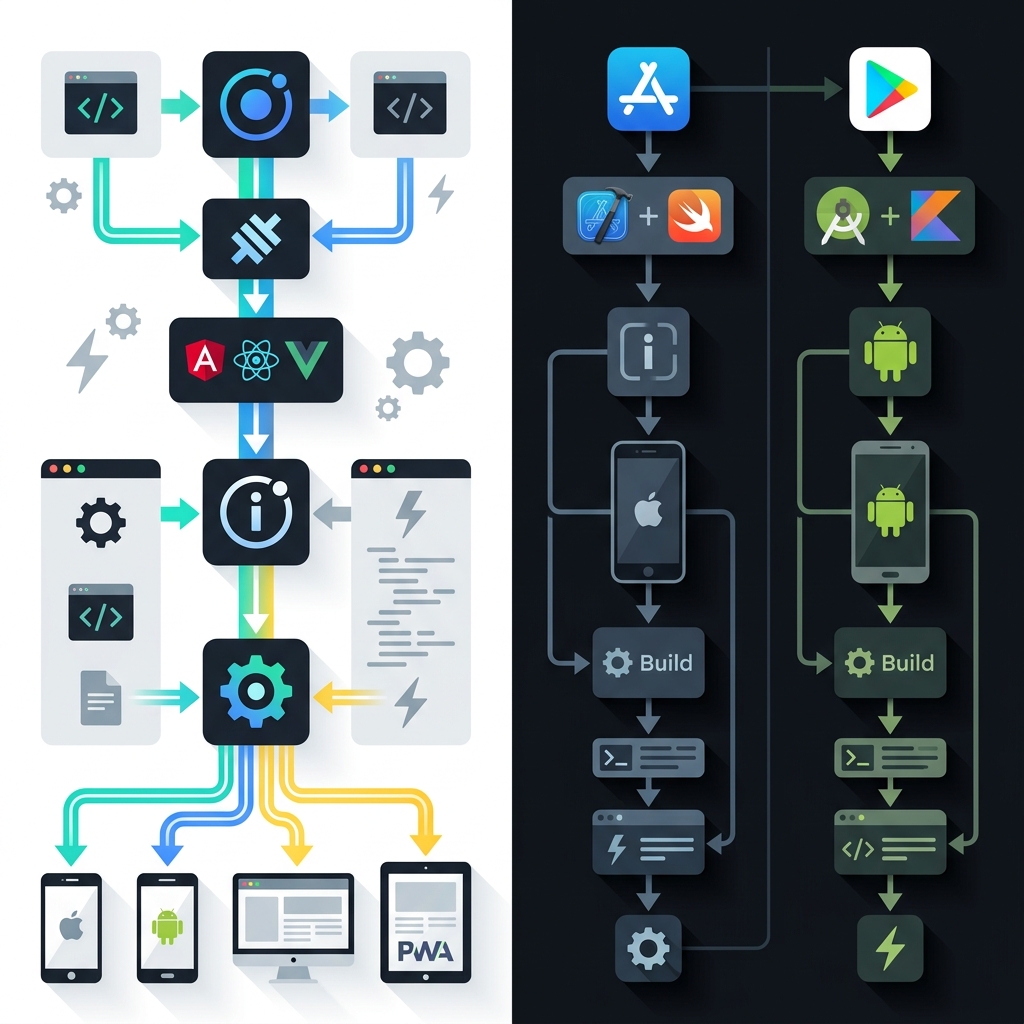
5. Comparison: Ionic vs. React Native vs. Flutter
Choosing the right framework depends on your existing team and the specific goals of the project. Here is how the ionic framework vs react native and ionic vs flutter debates usually play out.
| Feature | Ionic | React Native | Flutter |
|---|---|---|---|
| Language | HTML, CSS, JS/TS | JavaScript/TypeScript | Dart |
| Rendering | Web Standards (WebView) | Native UI Components | Skia/Impeller Engine |
| Web Support | Excellent (Native Web) | Good (via RN Web) | Good (via WASM) |
| Learning Curve | Low (Web Devs) | Medium (React Devs) | High (New Language) |
| Perf (Raw) | Good (95% of apps) | High | Very High |
| Developer Pool | Largest (All Web Devs) | Large (React Devs) | Growing (Specialists) |
Ionic vs. React Native
The main difference is in how they render the UI. React Native maps JavaScript components to actual native iOS and Android buttons. The alternative renders web components inside a browser container. ionic framework vs react native is usually a choice between "maximum performance" (React Native) and "maximum flexibility" (Ionic). If you already have a MEAN stack developer or a React team, the web-first approach allows them to be productive on day one without learning mobile-specific styling rules.
Also, React Native requires you to maintain a separate "Native" version of your styles. Here, your web CSS is your mobile CSS. This reduces the testing surface by 50%.
Ionic vs. Flutter
Flutter uses its own rendering engine (Impeller) to draw every pixel on the screen. This makes it incredibly fast and consistent. However, it requires learning Dart, a language that is not widely used outside of the Flutter ecosystem. ionic vs flutter often comes down to long-term maintenance. If your team is mostly web-focused, the framework is the safer bet. If you need a pixel-perfect, highly animated game-like interface, Flutter is superior. You can read more about this in our Flutter vs React Native guide.
6. Architecture and Design: Building Beautiful UIs
The design philosophy is built around "Adaptive Styling." This is a feature that automatically changes the look of your app components based on the platform it is running on.
Adaptive Styling in Action
When you use an component, it will automatically look like an iOS switch on an iPhone and a Material Design switch on an Android phone. You do not have to write a single line of conditional code. This guarantees that your app feels like a first-class citizen on both platforms. This is not just about aesthetics; it is about user muscle memory. Android users expect the "Back" button to behave a certain way, and iOS users expect the "Rubber-banding" effect at the end of a scroll list. The system handles these platform-specific quirks natively.
CSS Variables and Theming
The toolkit is built with CSS Variables (Custom Properties). This makes theming incredibly easy. You can change the entire brand color of your app by updating a single variable in your global stylesheet.
:root {
  --ion-color-primary: #00608c; /* Brand Blue */
  --ion-font-family: 'Inter', sans-serif;
}
This flexibility allows for "Dark Mode" support with almost zero effort. The framework provides a default dark theme that you can toggle based on the user's system settings. You can even define custom colors (e.g., brand-success, brand-danger) and use them consistently across all pre-built components.
Pre-built Component Library
There are over 100 pre-built components available, including cards, modals, infinite scrollers, and complex navigation controllers. These components are designed to be accessible (A11y) and responsive out of the box. This allows for rapid prototyping. A skilled developer can go from a blueprint application to a working MVP in a matter of days. This library is essentially a "Design System as a Service."
7. Enterprise Security: Hardening Your Ionic App
For enterprise applications, security is non-negotiable. Because these apps run in a WebView, they face a unique set of security challenges compared to "pure" native apps.
Hardening the WebView
The WebView should be configured to prevent unauthorized data access.
- Disable File Access: Prevent the WebView from reading files from the device's local filesystem unless explicitly required.
- Implement CSP (Content Security Policy): Use CSP headers to restrict where the app can load scripts and data from. This is the single most effective defense against Cross-Site Scripting (XSS).
- SSL Pinning: Use a Capacitor plugin to implement SSL pinning. This maintains the connection security by ensuring that your app only communicates with your specific server and prevents "Man-in-the-Middle" attacks on public Wi-Fi.
Secure Storage
Standard localStorage and sessionStorage are not encrypted. If a phone is stolen, an attacker can easily read that data. For sensitive information like OAuth tokens or user profiles, use the Capacitor Secure Storage plugin. This uses the native iOS Keychain and Android Keystore to encrypt data at the hardware level.
Biometric Authentication
It is easy to implement FaceID and Fingerprint scanning. The Fingerprint-AIO plugin provides a unified interface for both platforms. This allows you to add an extra layer of security before the user can access sensitive data or perform financial transactions.
8. Step-by-Step Guide: Building for Android
Building for the Google Play Store is a common goal for teams using the framework for android. Here is a high-level look at the process. We will use a framework by example approach to show the simplicity of the workflow.
Step 1: Environment Setup
You need Node.js and the CLI installed on your machine. For Android, you also need Android Studio and the Java Development Kit (JDK).
npm install -g @ionic/cli
Step 2: Create a Project
Start a new project using one of the official templates.
ionic start myApp tabs --type=react
Step 3: Add Capacitor
Initialize Capacitor in your project to enable native features.
ionic integrations enable capacitor
Step 4: Add the Android Platform
Tell Capacitor that you want to target Android.
npx cap add android
Step 5: Build and Sync
Compile your web code and copy it to the Android project. This step is where the magic happens—it transforms your web project into a native Android project folder.
ionic build
npx cap sync
Step 6: Native Integration
This is where you can add specific native functionality. For example, if you want to add GPS tracking, you install the plugin:
npm install @capacitor/geolocation
npx cap sync
Step 7: Run on a Device
Open the project in Android Studio and click the "Run" button to deploy it to a physical phone or an emulator.
npx cap open android
This workflow highlights the power of the platform. You spend 90% of your time in your favorite web editor (like VS Code) and only use the native IDEs for final deployment and signing. This is why many AI software development companies use this stack for their mobile interfaces—it allows them to focus on the AI logic rather than the platform-specific boilerplate.
9. Common Mistakes in Ionic App Development
Even with a powerful framework, it is easy to make architectural errors. Here are the most common pitfalls we see during audits.
1. Overloading the DOM
The DOM (Document Object Model) is the structure of your web page. If you have too many elements on a single page, the browser will struggle to render them at 60fps. Always use virtual scrolling for long lists and keep your component hierarchy shallow. If you are building a complex dashboard, use the MEAN stack developer approach of modularity—break the UI into small, independent pieces that can be updated in isolation.
2. Treating the App Like a Website
A mobile app is not a website. Users expect different navigation patterns. For example, on Android, users expect the hardware "Back" button to work. On iOS, they expect a "Swipe to go back" gesture. If you neglect these native expectations, your app will feel clunky and "cheap." The system provides the ion-back-button which handles this automatically, but you must remember to initialize it properly.
3. Misconfiguring Capacitor Plugins
Capacitor plugins are the bridge to the hardware. If you do not configure the permissions correctly (like the AndroidManifest.xml or Info.plist), the app will crash when it tries to access the camera or location. Always test these permissions on real devices, not just in the browser.
Important Warning
Never store sensitive API keys in your JavaScript code. Since these apps are built with web technology, anyone can inspect the source code of your installed app and find those keys. Always use a secure backend or an encrypted storage plugin for sensitive data. This is a basic rule of ios apps development services that many beginners forget.
4. Ignoring Offline State
Users expect mobile apps to work even with a poor connection. If your app just shows a "Network Error" the moment the user enters an elevator, they will delete it. Use service workers and local caching (like SQLite or Storage) to provide a graceful offline experience. This is especially important for enterprise field apps where connectivity is never guaranteed.
11. Conclusion: The Future of Cross-Platform Apps
The ionic framework has successfully moved through the transition from the "Cordova era" to the modern era of high-performance hybrid apps. By betting on web standards, it has guaranteed that developers can use the same tools and techniques they use for web development services to build world-class mobile software.
The choice of a mobile stack is ultimately a strategic business decision. If you want to launch on three platforms simultaneously with a single team, this ecosystem is the most efficient choice available today. It allows you to build an app once and deploy it as a web app, an Android app, and an iOS app without duplicating your efforts.
In 2026, the complexity of mobile development is no longer about the "language" you use, but about the integration of AI agents, offline reliability, and secure data handling. The framework provides the UI stability you need so you can focus on those high-value features. It acts as the "Standard Library" for cross-platform engineering.
Ready to modernize your mobile strategy?
At UseShift, we help businesses transition from fragmented native codebases to unified, high-performance hybrid ecosystems.
Discuss your AI roadmap