
![Google Cloud Computing Cost: The Ultimate Pricing & Optimization Guide [2026]](/images/blog/google-cloud-computing-cost-hero.png)
What is the best way to reduce Google Cloud computing costs in 2026?
The most effective strategy is a combination of Rightsizing (using only the resources you need), Committed Use Discounts (committing to 1-3 year terms for 50%+ savings), and leveraging Spot Instances for non-critical batch processing.
As organizations migrate more workloads to the cloud in 2026, understanding Google Cloud computing cost has become a critical skill for CTOs and DevOps teams.
While Google Cloud Platform (GCP) offers some of the most advanced AI and data analytics tools on the market, its pricing structure can be notoriously complex. Navigating this landscape requires understanding the interplay between service tiers, regional variations, and discount programs. In this guide, we break down how Google Cloud computing pricing works and how to strategically reduce your bill.
What is Google Cloud Computing Cost?
Google Cloud computing cost is the total expenditure an organization incurs when using Google Cloud Platform services. It is calculated based on a pay-as-you-go model, committed use discounts, and regional pricing variations. To manage these effectively, it is often helpful to have a deep understanding of the platform, which you can gain through the best Google Cloud courses available today.
Key Takeaways
- GCP pricing is granular, billing for specific vCPUs, RAM, storage, and network egress.
- The Pay-As-You-Go model offers maximum flexibility but is the most expensive per-unit tier.
- Sustained Use Discounts (SUDs) are automatic and require no manual configuration.
- Committed Use Discounts (CUDs) can save up to 57% for 1-3 year commitments.
How Google Cloud Pricing Works: The Core Mechanics
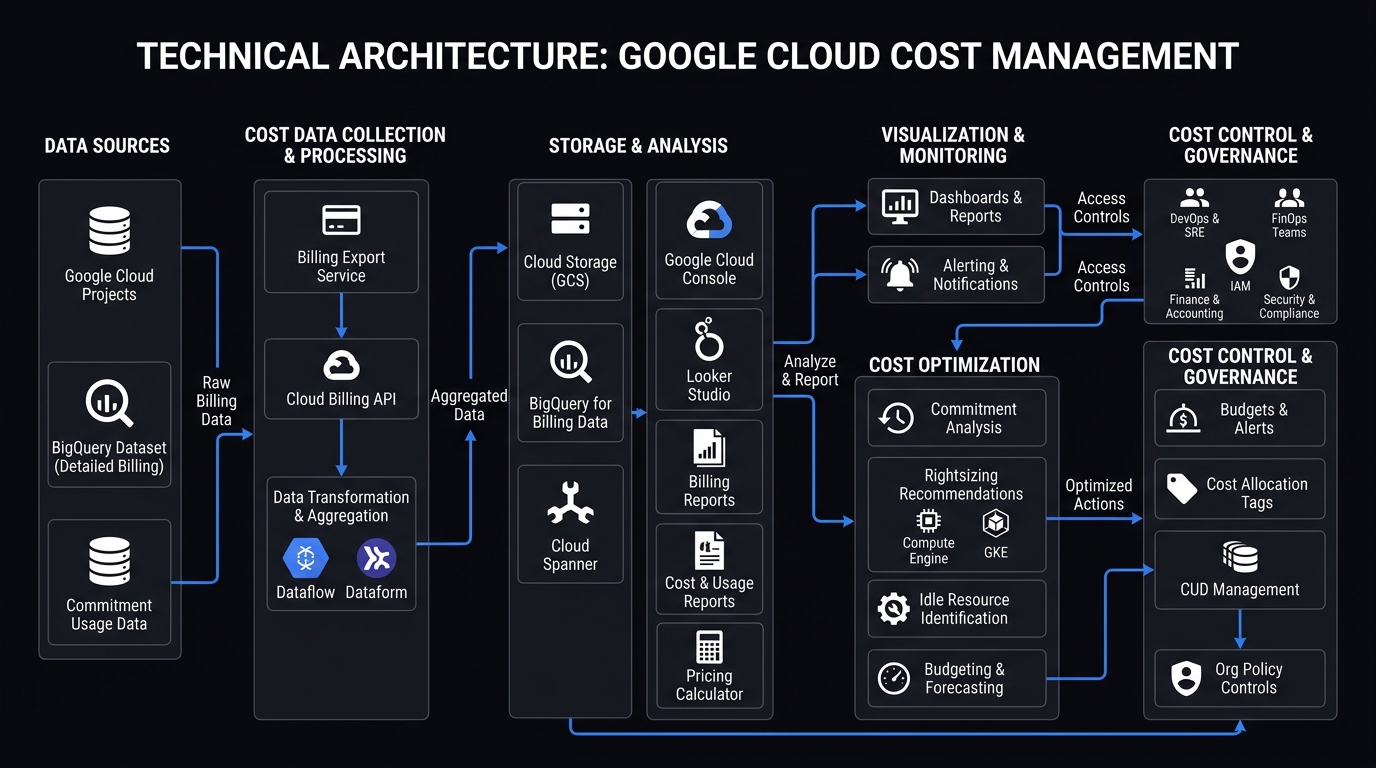
Understanding the mechanics of Google Cloud computing pricing is the first step toward optimization. Google employs several different billing models:
1. Pay-As-You-Go (On-Demand)
The most flexible model, where you pay only for the resources you consume. Ideal for unpredictable workloads or short-term projects.
2. Sustained Use Discounts (SUDs)
Automatic discounts of up to 30% that apply when you run specific Compute Engine instances for a significant portion of the billing month.
3. Committed Use Discounts (CUDs)
For predictable workloads, you can commit to a 1-year or 3-year term for deep discounts of up to 57-70%.
Google Cloud vs. AWS vs. Azure Pricing
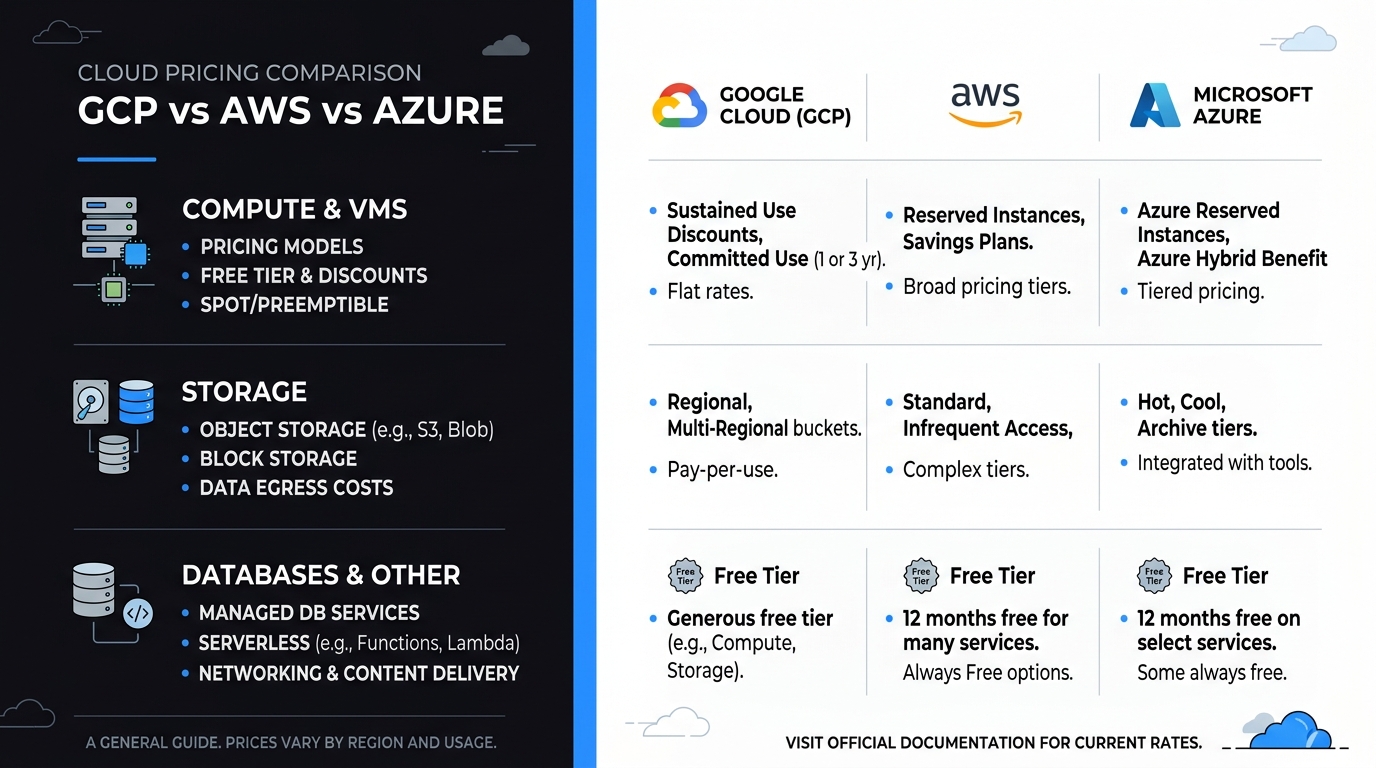
While all "Big Three" providers offer similar services, their pricing philosophies differ significantly.
| Feature | Google Cloud (GCP) | Amazon Web Services (AWS) | Microsoft Azure |
|---|---|---|---|
| Billing Increment | Per Second | Per Second | Per Second |
| Automatic Discounts | Sustained Use (SUDs) | None (Requires RIs) | None (Requires RIs) |
| Commitment Type | Resource-based CUDs | Reserved Instances (RIs) | Reserved Instances (RIs) |
| Spot Pricing | Fixed Discount (Spot) | Market-driven pricing | Fixed Discount (Spot) |
| Best For | AI, Data, Kubernetes | Global Scale | Enterprise Integration |
Key Factors Influencing Your GCP Costs
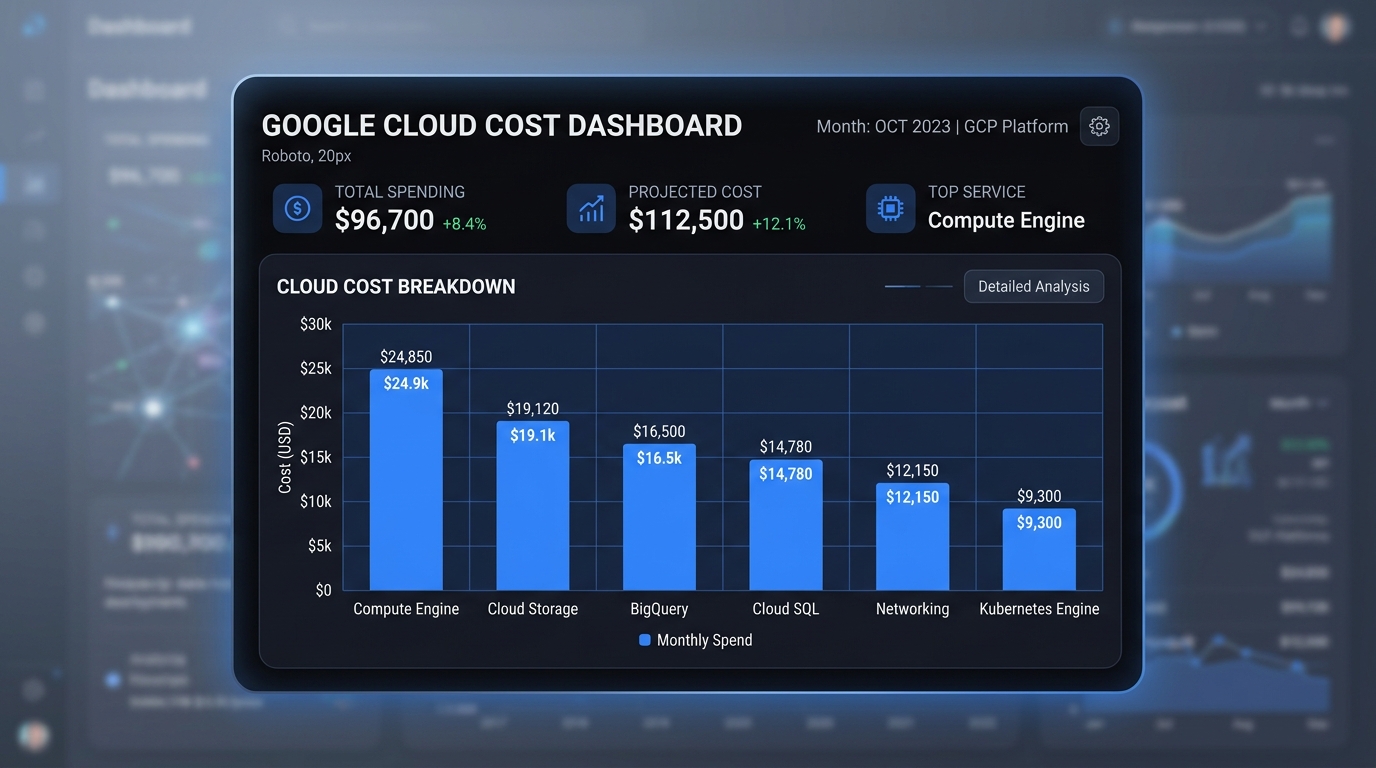
To master your budget, you must understand the primary drivers of your Google Cloud bill:
- Compute: Machine types, vCPUs, and RAM configurations in Compute Engine and GKE.
- Storage: At-rest storage tiers (Standard, Nearline, Coldline, Archive) and operation fees.
- Networking: Egress (data leaving GCP) is the primary cost driver here; Ingress is generally free.
- Region: Costs vary by geographical location; us-east1 is often cheaper than specialized regions.
The Hidden Threat: Network Egress Fees
One of the most frequently misunderstood aspects of google cloud computing cost is network egress. While virtually all major cloud providers allow you to ingest (upload) data into their ecosystem for free, moving data out of the cloud—or even between different geographic regions within the same cloud provider—incurs egress charges. In 2026, multi-cloud architectures are increasingly common, but constantly shipping massive datasets from GCP to AWS for specific machine learning pipeline processing can obliterate your IT budget. To mitigate this, organizations must architect their systems to process data as close to the storage bucket as possible, utilizing GCP's internal network tiers and VPC peering rather than routing traffic over the public internet.
Demystifying Cloud Storage Tiers
Not all data needs to be accessed in milliseconds. Google Cloud Storage offers four distinct tiers, and properly classifying your data across these tiers is paramount for cost management.
Standard Storage is designed for high-frequency access (hot data), such as active website assets or live database streaming. Nearline Storage is ideal for data accessed less than once a month, offering cheaper at-rest costs but introducing minor retrieval fees. Coldline Storage is intended for data accessed barely once a quarter (like disaster recovery backups). Finally, Archive Storage provides the absolute lowest at-rest pricing in the industry, designed for regulatory compliance data that is accessed less than once a year. However, beware: retrieving data from Archive Storage incurs massive data retrieval penalties. Automatically shifting objects between these tiers using Object Lifecycle Management is a critical FinOps strategy.
GKE (Google Kubernetes Engine) Pricing Mechanics
Google Kubernetes Engine is arguably the most powerful managed Kubernetes service available today, but its pricing structure has evolved. You pay a flat cluster management fee (per hour, per cluster) for the control plane, plus the standard Compute Engine pricing for the underlying worker nodes. In 2026, many enterprises have shifted toward GKE Autopilot. While Autopilot abstracts away node management and charges you strictly per pod provisioning (CPU, memory, and ephemeral storage requested by the pod), it can occasionally result in higher month-end bills if your developers are over-requesting resources. Transitioning between GKE Standard and GKE Autopilot requires a deep audit of your team's container resource limits.
7 Proven Strategies for Cost Optimization
Optimizing your cloud spend is a continuous process requiring cultural shifts as much as technical adjustments. Here are the most effective strategies for 2026:
- Rightsizing: Over-provisioning is the original sin of cloud computing. Developers routinely request a 16-core machine when a 4-core machine would suffice simply "to be safe." Use the native GCP Recommender AI to identify and downsize consistently underutilized Virtual Machines without impacting application performance.
- Spot Instances (Preemptible VMs): For fault-tolerant, stateless batch processing (like video rendering or massive Hadoop data analytics jobs), Spot Instances can save you up to 91% compared to standard on-demand pricing. The trade-off is that Google can reclaim these instances at any time with only a 30-second warning, meaning your application architecture must be resilient to sudden node termination.
- Committed Use Discounts (CUDs): If you know your baseline usage will not drop below a certain threshold over the next year, lock it in. Resource-based CUDs allow you to commit to a specific amount of vCPUs and RAM in a specific region for 1 or 3 years, unlocking savings of up to 57%. Spend-based CUDs offer slightly less discount but provide flexibility across all regions and machine families.
- Serverless Architecture Transition: Refactoring legacy applications to utilize Cloud Functions or Cloud Run allows you to pay exclusively for millisecond execution time rather than paying for an idle server to spin 24/7 waiting for inbound traffic.
- Resource Scheduling: Why pay for development, QA, and staging environments on weekends or overnight when your engineering team is asleep? Implementing automated start/stop schedules using Cloud Scheduler and Cloud Functions can instantly reduce your non-production compute bill by up to 65%.
- Automated Lifecycle Policies: Do not rely on humans to manually move old logs into cold storage. Configure GCP Storage Lifecycle rules to automatically transition objects older than 90 days from Standard to Nearline, and objects older than 365 days into Archive.
- Implementing a FinOps Culture: The most significant savings come from organizational alignment. Utilize Google Cloud Organizations to enforce billing quotas and implement robust resource tagging (labeling every resource by department, environment, or project). This allows finance teams to track exact spend accountability down to the individual engineering squad.
The Rise of Agentic AI Cloud Management
Looking deep into 2026, the forefront of google cloud computing cost optimization is being driven by Agentic AI. Instead of merely providing dashboard recommendations for humans to review, autonomous AI agents are now being granted restricted IAM permissions to actively rightsize infrastructure in real-time. These intelligent agents monitor traffic patterns, automatically purchase short-term commitment contracts on secondary markets, and dynamically scale GKE clusters down to absolute minimum thresholds during micro-lulls in traffic, completely removing human hesitation from the optimization pipeline.
Conclusion: Turning Expense into Efficiency
Mastering Google Cloud computing cost is an essential part of a modern cloud strategy. By understanding pricing models and implementing rigorous optimization, you can turn your infrastructure into a lean, scalable engine for growth.
Need a Professional Cloud Audit?
We help businesses reduce their GCP spend by an average of 30-45% within the first three months.
Get Your Free Cost Audit →