

What is the main difference between Docker and Kubernetes?
Docker is a platform for building, running, and managing individual containers, while Kubernetes is a container orchestration system designed to automate the deployment, scaling, and management of those containers across a cluster of machines. Docker creates the containers; Kubernetes manages them at scale.
In the rapidly evolving landscape of 2026, the debate between dockers vs kubernetes remains one of the most critical discussions for DevOps engineers, architects, and business leaders alike. While often framed as a competition, the reality is far more nuanced. Understanding the relationship between these two powerhouses is essential for building scalable, resilient, and efficient modern applications.
At UseShift, we have seen hundreds of organizations struggle with this choice. The key to success in 2026 is not choosing one over the other, but understanding how they complement each other in a modern cloud-native stack. This guide provides a deep dive into the technical mechanics, performance benchmarks, and strategic considerations for your containerization journey.
💡 Pro Tip
Think of Docker as an individual shipping container and Kubernetes as the giant crane and logistics system at the port. You need the container to hold the goods, but you need the system to move thousands of them efficiently.
1. What is Docker? (And Why People Say "Dockers")
Docker revolutionized the way we develop and deploy software by popularizing containerization. A container is a lightweight, standalone, and executable package that includes everything needed to run an application: code, runtime, system tools, system libraries, and settings.
The term "Dockers" is often used colloquially to refer to the collection of tools in the Docker ecosystem, including Docker Engine, Docker Desktop, and Docker Compose. However, in technical terms, Docker is the company and the primary runtime technology.
The Docker Architecture
To understand Docker, we must look at its core components:
- Docker Engine: The client-server application that builds and runs containers.
- Docker Images: Read-only templates used to create containers. They are built in layers, which makes them highly efficient.
- Docker Containers: The live, running instances of Docker images.
- Docker Registry: A storage and distribution system for named Docker images.
The Role of the Docker Registry
A Docker Registry is essential for any serious container workflow. It allows you to store your custom images securely and share them across your team or with your Kubernetes cluster. While Docker Hub is the most famous public registry, many enterprises use private registries like Amazon ECR or self-hosted solutions to ensure security and compliance.
2. What is Kubernetes?
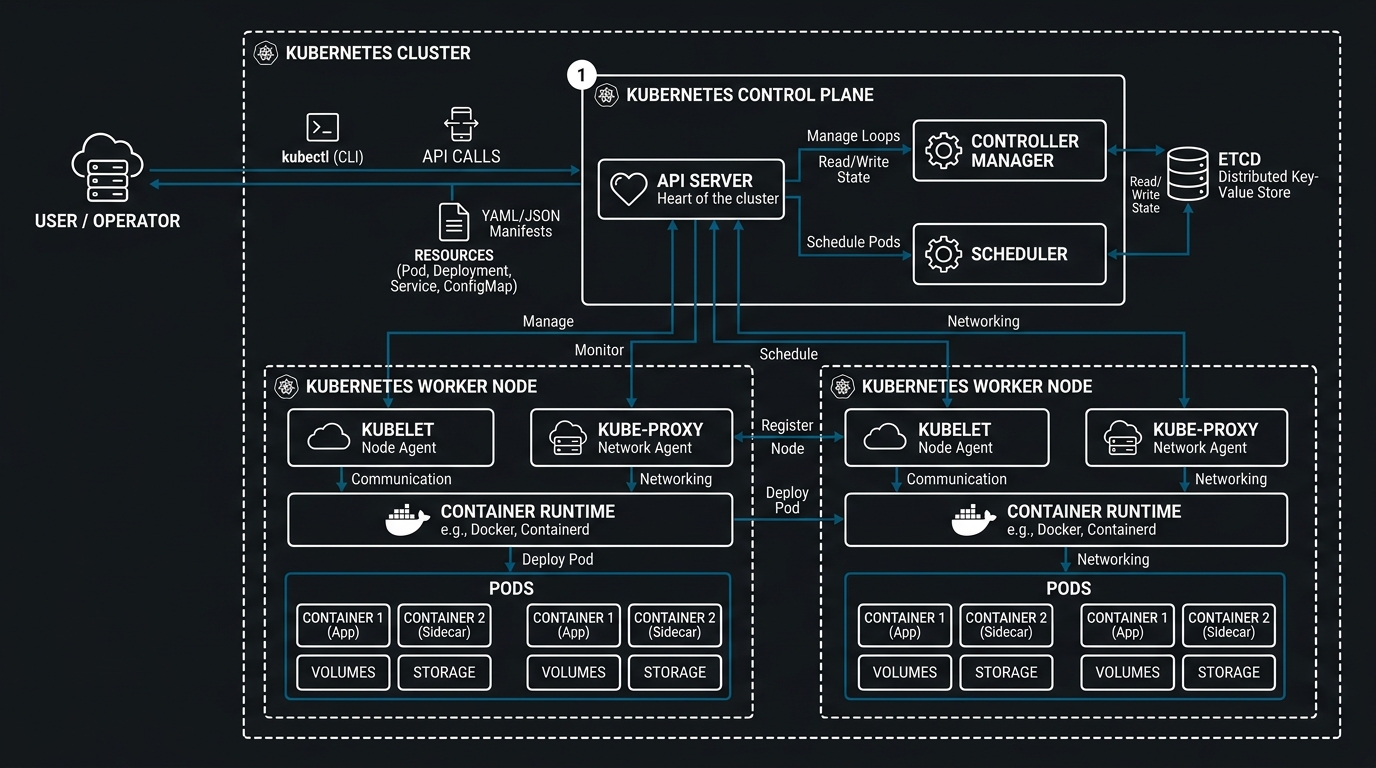
As applications grow from a handful of containers to hundreds or thousands, manual management becomes impossible. This is where Kubernetes (often abbreviated as K8s) comes in. Originally developed by Google, Kubernetes has become the industry standard for container orchestration.
Kubernetes operates on a cluster architecture. It doesn't just run containers; it ensures they stay running, scales them up when traffic hits, and manages how they talk to each other.
Key Kubernetes Features:
- Self-healing: Restarts failed containers, replaces and reschedules containers when nodes die.
- Horizontal scaling: Scales your application up and down based on CPU usage or other metrics.
- Automated rollouts and rollbacks: Gradually rolls out changes to your application or its configuration.
- Service discovery and load balancing: Gives containers their own IP addresses and a single DNS name for a set of containers.
3. Dockers vs Kubernetes: The Key Differences
To truly understand the "dockers vs kubernetes" comparison, we must look at their different scopes of operation.
| Feature | Docker (Standalone) | Kubernetes (Orchestration) |
|---|---|---|
| Primary Goal | Containerizing individual applications | Managing clusters of containers |
| Scaling | Manual or basic (via Docker Swarm) | Automated, highly scalable |
| Self-Healing | Limited | Advanced (Auto-restarting, rescheduling) |
| Complexity | Low (Easy to learn) | High (Steep learning curve) |
| Installation | Single machine focus | Cluster-wide focus |
| Networking | Basic bridge/host networking | Complex, extensible networking models |
Docker is perfect for packaging your application and running it on a single host. Kubernetes is designed to run that same application across a fleet of servers, providing high availability and fault tolerance that Docker alone cannot provide.
4. Deep Dive: Docker Compose vs Kubernetes
While the core debate is often dockers vs kubernetes, the more practical comparison for developers is often Docker Compose vs Kubernetes.
Docker Compose: The Local Hero
Docker Compose is a tool for defining and running multi-container Docker applications. With Compose, you use a YAML file to configure your application’s services. Then, with a single command, you create and start all the services from your configuration.
It is excellent for:
- Local development environments.
- Single-host deployments.
- Simple CI/CD pipelines.
Kubernetes: The Production Titan
While Docker Compose is great for local work, it lacks the high availability and scaling features required for production. Kubernetes provides:
- Pod abstraction: Grouping containers together for shared storage and networking.
- Ingress controllers: Managing external access to services.
- Secrets and ConfigMaps: Securely managing configuration without rebuilding images.
5. Containerization in Cloud: AWS and Kubernetes
In 2026, most businesses aren't running their own hardware. They are using containerization in cloud environments. The relationship between AWS and Kubernetes is particularly strong through Amazon EKS (Elastic Kubernetes Service).
Why Choose AWS EKS?
EKS removes much of the "undifferentiated heavy lifting" of running Kubernetes. AWS manages the control plane availability and scalability, allowing you to focus on your containers. Combined with AWS Fargate, you can run serverless Kubernetes, where you don't even have to manage the underlying EC2 instances.
Containerization in the Cloud Statistics
- 75% of global organizations will be running containerized applications in production by 2026.
- AWS holds a 45% market share in managed Kubernetes services.
- Serverless container adoption (Fargate/Cloud Run) has grown by 300% since 2024.
6. Networking: CNI and Service Mesh
Networking is one of the biggest differences in the dockers vs kubernetes landscape.
Docker Networking
Docker uses a simple bridge networking model by default. Each container gets an IP on a private network, and ports are mapped to the host. This works well for single machines but breaks down in distributed systems.
Kubernetes Networking
Kubernetes requires a flat network where every pod can talk to every other pod without NAT. This is achieved via the Container Network Interface (CNI). Popular CNI plugins include Calico, Flannel, and AWS VPC CNI.
7. Storage and Persistence: Docker Volumes vs CSI
Managing state in containers is notoriously difficult.
Docker Volumes
Docker volumes are the preferred mechanism for persisting data generated by and used by Docker containers. They are completely managed by Docker and are easy to set up for local use.
Kubernetes CSI (Container Storage Interface)
Kubernetes uses the CSI to allow third-party storage providers to expose their storage systems to Kubernetes. This allows you to use EBS volumes, EFS, or even on-premise SANs as persistent volumes that move with your containers across the cluster.
⚠️ Important Warning
Never store production data inside a container's writable layer. Always use Volumes or Persistent Volume Claims (PVCs) to ensure data survives container restarts and rescheduling.
8. Why You Need Both: The Complementary Nature
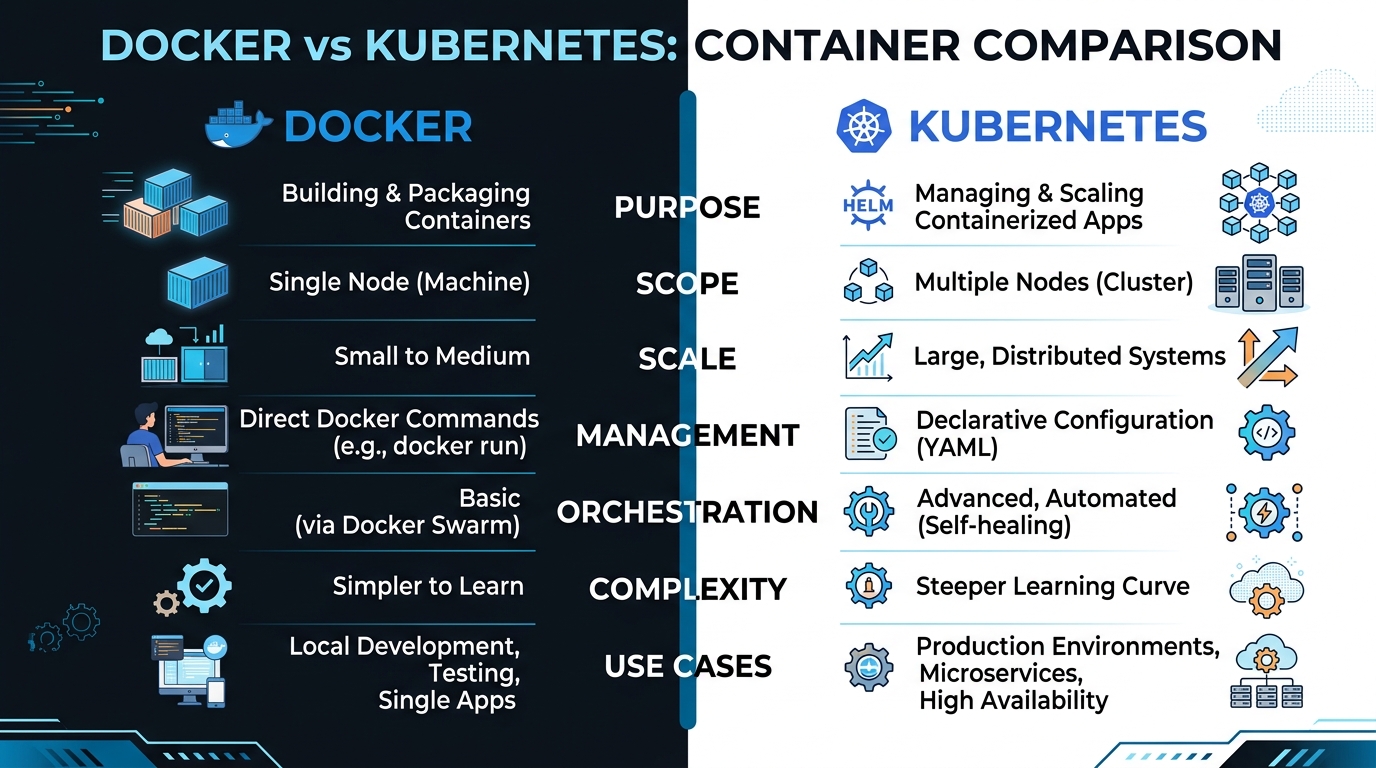
The "vs" in "dockers vs kubernetes" is slightly misleading. In a modern workflow, you use both:
- Develop locally using Docker and Docker Compose.
- Build your images and push them to a Docker Registry.
- Deploy those images to a Kubernetes cluster in production.
This "Docker for development, Kubernetes for production" pattern is the industry standard in 2026. It gives developers a fast, consistent environment while giving operations the tools they need to manage scale and reliability.
9. Scaling Your Business with AI and Containers
At UseShift, we specialize in deploying AI agents and autonomous workflows. These AI systems are almost always containerized. Why? Because AI models often require specific, complex dependencies and GPU configurations that are difficult to manage without containers.
Dynamic AI Scaling
By using Kubernetes, we can scale AI workloads dynamically. If your AI customer support agent suddenly gets 1,000 requests, Kubernetes can spin up more container instances to handle the load, and then spin them down when the rush is over to save you money.
10. Security Considerations for 2026
Security is no longer an afterthought in the dockers vs kubernetes world.
Docker Security
- Rootless Docker: Running the Docker daemon as a non-root user to reduce the attack surface.
- Image Scanning: Automatically checking your images for vulnerabilities in the registry.
Kubernetes Security
- RBAC (Role-Based Access Control): Controlling who can do what within the cluster.
- Network Policies: Defining how pods are allowed to communicate with each other.
- Secrets Management: Using HashiCorp Vault or AWS Secrets Manager instead of native K8s secrets.
Key Takeaways
- Docker is for packaging, Kubernetes is for orchestration.
- The industry standard is Docker for development and Kubernetes for production.
- Cloud-managed Kubernetes (like EKS) reduces operational overhead significantly.
- Security must be integrated into the CI/CD pipeline, not added at the end.
Conclusion
The choice between dockers vs kubernetes is not about which one is better, but about choosing the right tool for the job. Docker is the foundation of containerization, while Kubernetes is the engine that drives it at scale. By leveraging the strengths of both, you can build a modern, scalable, and resilient infrastructure that will serve your business well through 2026 and beyond.
Ready to Shift to Containerized AI?
Our experts help you deploy autonomous agents and scalable container workflows in weeks, not months.
Get a Free Audit